Problem:
You have an SSRS Report with a Tablix. You set “Keep headers visible while scrolling” in the Tablix Properties, however, your column headers are still not showing when scrolling or changing pages in your report.
So you turn to your old friend Google and stumble across several posts such to help you solve your problem such as this one from msdn: Tablix headers not repeating in SSRS 2008. You follow the steps but when you do, it either still isn’t repeating your column headers or you get a nice error message such as this:
“the tablix has an incorrectly set fixedheader property on the opposite hierarchy…”
WTH? Right? Well luckily after a couple frustrating hours of double checking and going through all these steps again, I stumbled onto this blog post: Keep Column Headers Visible while Scrolling in SSRS 2008.
What is important to note here is you must follow these steps exactly in this order or you will run into problems. So here it goes:
Solution:

2. Under the General Tab, uncheck “Keep Header Visible while Scrolling” from both the Row Headers and Column Headers Sections -> Click “OK”

3. Go to the Grouping Section below your Report and Click on the down arrow on the Far Right next to “Column Groups” (This will take you into Advanced Mode).

4. You will see going into Advanced Mode caused a “Static” Property to show above your grouping in the Row Groups section. Important: Select the FIRST “Static” Property in this section and perform the following steps on this property only!
5. In the Properties for the first “Static” element, set “FixedData” to be TRUE
6. Set “RepeatOnNewPage” to TRUE
7. Set “KeepWithGroup” to AFTER
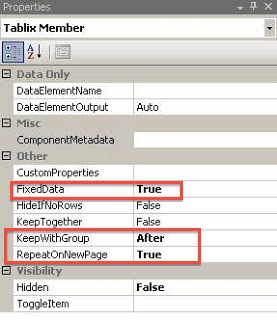
8. Build your report and Run. You will now see your column headings are repeating!
Great solution!! It works very well. In case somebody is using Table instead of Matrix, just update the properties of Static under Row Group instead of Column Group. Hope it helps!!
Wow! Thank you so much! That worked! This is going to OneNote 🙂
Actually it works using preview in VS2008, but after publishing to report server and calling the report from asp.net, it does not work. Perhaps I'm calling the report in the wrong mode?
Actually it works using preview in VS2008, but after publishing to report server and calling the report from asp.net, it does not work. Perhaps I'm calling the report in the wrong mode?
Thank you very much. This solved my issue.
YEs it works when I run and build. But when I click on report on reportserver it doesn't work. Any idea?
Worked great. Thanks!!
Sanity Saving…Thank you.
great article sir
Thanks!
they repeat on each page, they don't scroll with the page.
You solved a very painful problem for me! I owe you a cold one…
It's working
THANK YOU SO MUCH AND GOD BLESS