I’ve been playing around with the new SharePoint column formatting capabilities lately. Microsoft has released the ability to apply formatting to your MODERN SharePoint list columns via JSON. The PNP team has a ton of great examples out there that you can reference. Here’s a link to some great documentation to get you started: https://docs.microsoft.com/en-us/sharepoint/dev/declarative-customization/column-formatting
Desired Functionality
One of my clients requested the ability to check if a column value is blank or null and if so, highlight that column Yellow to bring it to their attention. They want something that looks like this:
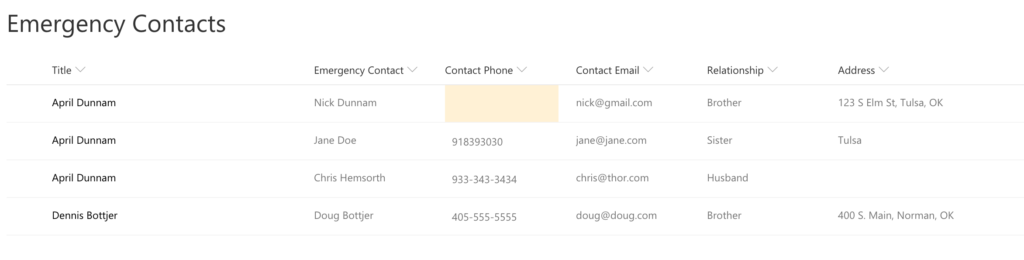
I started looking at the Microsoft documentation but I didn’t find any examples of how to target a blank or null object. Since I am familiar with JSON I knew what to do. But, for those of you not as familiar with it, I thought I would share the code for how to handle this.
Making it Happen
It’s a very short and simple piece of JSON to make this functionality work. I’ve added the JSON to my GitHub which you can download here:
https://github.com/aprildunnam/SPJS/blob/master/ColumnFormatHighlightBlankValue
To apply the column formatting to your SharePoint list do the following:
- Go to the column in question and click the dropdown arrow and select “Format This Column”

- In the box that shows at the right, paste in the JSON referenced above. Click Save.
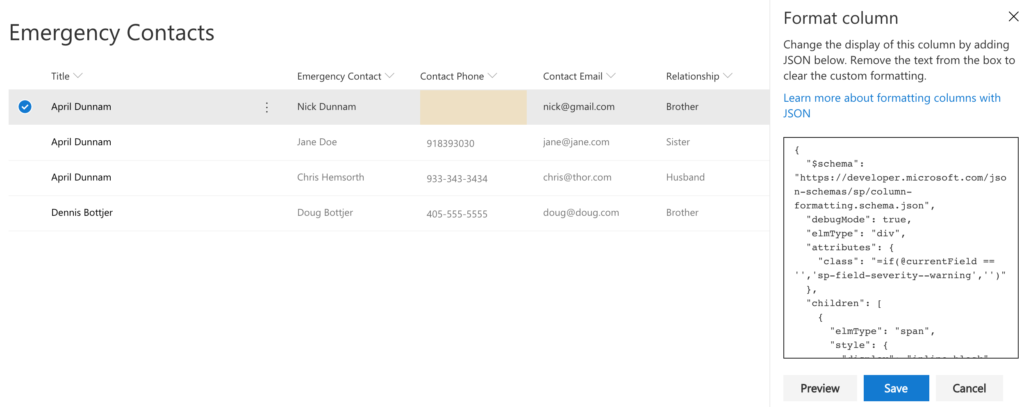
That’s all you have to do to get color coding for null/blank values. In the JSON, you reference a null/blank value by using two single quotes (”) with no space in-between as shown in the screenshot below.
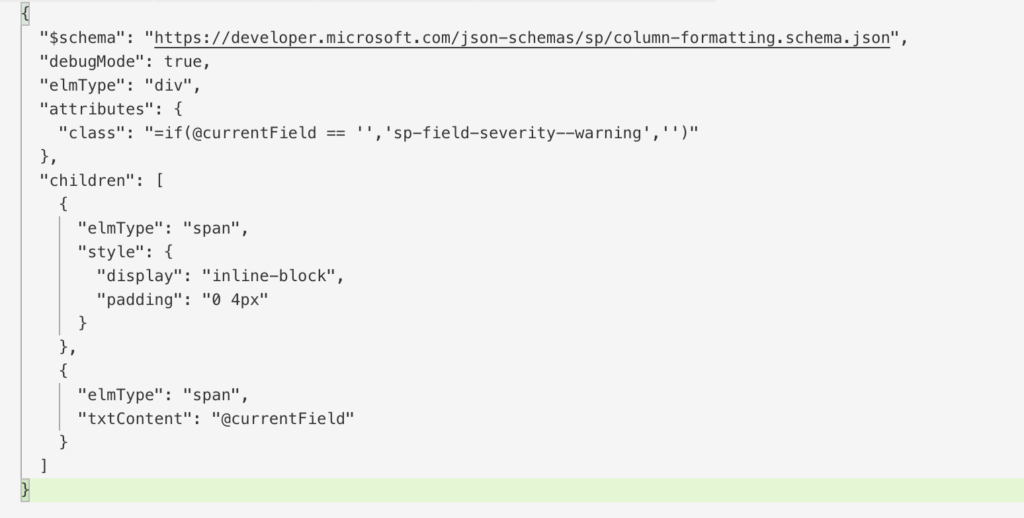
The ‘sp-field-severity–warning’ is a built in class that is a yellow color. If you’d rather use a different color you can reference a different class. For example, ‘sp-field-severity–blocked’ will display a red color and ‘sp-field-severity–good’ will show a green color.
Hi April,
Fantastic article as always!
Do you know if a similar solution exists to highlight folders in a Document Library that are empty?
Great post, I’m trying to adapt to go the other way. Basically, apply background color when a date meets a certain criteria, no background color if no date entered. The evaluation of the current field being ” (null) never evaluates true, even when I see no value. Any suggestions. Thanks!
Hi April. Thanks for sharing this. May I ask, how might I adjust the JSON to colour the cell if the cell is not blank (so opposite of what you have)?
Hi, this does not appear to work when formatting an entire row. When I use the basic conditional formatting build in, it generates this JSON
{
“additionalRowClass”: {
“operator”: “:”,
“operands”: [
{
“operator”: “>”,
“operands”: [
{
“operator”: “Date()”,
“operands”: [
{
“operator”: “toDateString()”,
“operands”: [
{
“operator”: “Date()”,
“operands”: [
“[$ExpirationDate]”
]
}
]
}
]
},
{
“operator”: “Date()”,
“operands”: [
{
“operator”: “toDateString()”,
“operands”: [
{
“operator”: “Date()”,
“operands”: [
“@now”
]
}
]
}
]
}
]
},
“sp-css-backgroundColor-successBackground”,
{
“operator”: “:”,
“operands”: [
{
“operator”: “<=",
"operands": [
{
"operator": "Date()",
"operands": [
{
"operator": "toDateString()",
"operands": [
{
"operator": "Date()",
"operands": [
"[$ExpirationDate]"
]
}
]
}
]
},
{
"operator": "Date()",
"operands": [
{
"operator": "toDateString()",
"operands": [
{
"operator": "Date()",
"operands": [
"@now"
]
}
]
}
]
}
]
},
"sp-css-backgroundColor-blockingBackground50",
{
"operator": ":",
"operands": [
{
"operator": "==",
"operands": [
{
"operator": "Date()",
"operands": [
{
"operator": "toDateString()",
"operands": [
{
"operator": "Date()",
"operands": [
"[$ExpirationDate]"
]
}
]
}
]
},
{
"operator": "Date()",
"operands": [
{
"operator": "toDateString()",
"operands": [
{
"operator": "Date()",
"operands": [
""
]
}
]
}
]
}
]
},
"sp-css-backgroundColor-warningBackground50",
""
]
}
]
}
]
}
}
On the last operand, it is comparing the Date with "", and I have tried switching that to compare with null, but that doesn't work either.
Can you assist?
HI! This JSON doesn’t work on Date columns – can you tell me what I need to change in the code to enable the formatting to work?